Workflow Guide

Delayed Etsy Order Import + Browser Extension

The powerful combination that gives you complete order data, enables Judge.me integration, and streamlines your entire shipping workflow.

Get Started About the Extension

Complete Order Data from Day One

Stop using placeholder data that breaks your workflow

Real Customer Information

Not Placeholders

  • Orders wait for the buyer's real email instead of a placeholder like “etsy-[receipt]@placeholder.orderbridge.app”
  • Full shipping addresses captured directly from Etsy orders
  • Complete contact information for post-purchase communication

Judge.me Integration

That Actually Works

  • Real customer emails enable proper review verification
  • Automated review requests reach actual buyers
  • Build social proof without manual intervention
  • No failed verifications from placeholder emails

Shipping Workflow Optimization

Everything you need to fulfill orders efficiently

Everything for Fulfillment

  • Complete shipping addresses sync to Shopify immediately
  • Ready to print labels through PirateShip or your preferred shipping app
  • No toggling between platforms to copy/paste addresses
  • All order management happens in Shopify's superior ecosystem

Tracking Number Management

  • Bought the label on Etsy? Its tracking is added to the Shopify order and the order is marked fulfilled for you
  • Browser extension handles Etsy's tracking upload (since their API doesn't allow it)
  • Shipped from Shopify? The extension fills in Etsy's tracking form; you check it and click Complete order
  • Maintain seller metrics on Etsy while managing from Shopify
  • Historical imports auto-apply tracking — When importing orders already shipped on Etsy (via Import All History or during onboarding), tracking numbers are fetched from Etsy automatically and applied as Shopify fulfillments in the same step. No manual entry needed.
  • Cancelled and unpaid orders are skipped — Import All History filters out cancelled and unpaid Etsy orders automatically. Only valid, paid, non-cancelled orders are queued — you will never end up with a cancelled Etsy order appearing as an active Shopify order.

Important: Historical Import Doesn’t Use the Extension

  • Import All History pulls straight from Etsy’s API — this bypasses the extension entirely, regardless of whether Delayed Import is turned on for your shop.
  • Old orders imported this way get placeholder emails (and no address, unless Etsy shares it for your shop) — the extension can only capture real customer data for an order while you’re actively viewing it on Etsy in real time. It has no way to go back and capture data for orders from weeks or months ago.
  • What this means in practice: if you run Import All History to bring in your past Etsy orders, expect those orders to arrive in Shopify with a placeholder email (e.g. “etsy-[receipt]@placeholder.orderbridge.app”) rather than the buyer's real email, and for most shops no address — even with Delayed Import enabled.
  • Delayed Import + the extension only apply going forward — they capture real data for new orders as they come in on Etsy, not for orders imported in bulk from order history.

How the Extension Works With Etsy

What it does, and what stays in your hands

You Stay in Control

  • Runs only on Etsy order pages, in your own logged-in browser
  • Tracking is never submitted for you: it fills in Etsy's form and you click Complete order
  • It never touches your Etsy listings

Handles API Limitations Gracefully

  • Etsy never shares buyer emails with apps, and for most shops not the address → the extension captures both from the order page
  • For most shops Etsy doesn't accept tracking from apps → the extension fills in Etsy's tracking form
  • Labels bought on Etsy can't be downloaded by apps → the extension saves a copy

Time Savings & Accuracy

Eliminate manual work and reduce errors

Eliminate Manual Data Entry

  • No copying addresses between platforms
  • No manual tracking number uploads to Etsy
  • No manual email collection for review requests
  • Orders flow automatically once extension captures data

Reduce Errors

  • No typos from manual address entry
  • No missed tracking updates
  • No lost review opportunities
  • Consistent data across both platforms

See It on a Real Order

One real Etsy order, recorded start to finish: first imported live for comparison, then handled by delayed import and the extension. The buyer's name, address and email are masked; the name you see in Shopify is a stand-in.

Narrated walkthrough · 1:34 · captions in the player menu. Every step is also written out below.

Before you start

  • OrderBridge installed and your Etsy shop connected (see Getting Started).
  • The OrderBridge browser extension installed in Chrome (get the extension), and you're logged in to your Etsy shop in that browser.
  • Delayed Import turned on in Settings.
  1. 1A new order waits as Pending

    OrderBridge finds new paid Etsy orders automatically. With Delayed Import on, a new order is stored as Pending (Etsy: Needs Address) and nothing is created in Shopify yet.
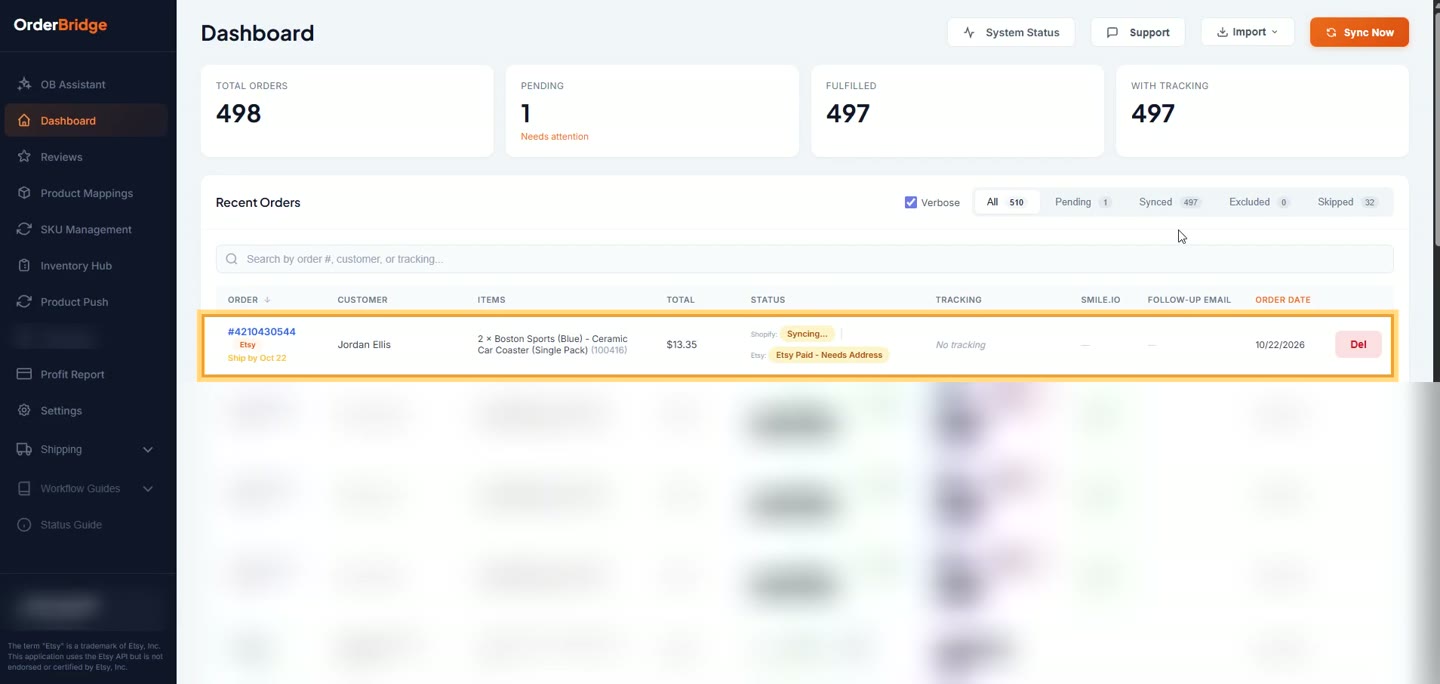
    A new order waits as Pending
  2. 2For comparison: the same order imported live

    With Live Import, the order goes to Shopify as soon as it's found, with only what Etsy's API provides. Etsy never shares the buyer's email, so the order gets a placeholder (etsy-[receipt]@placeholder.orderbridge.app). Whether the shipping address comes through depends on your Etsy shop: most US shops don't get it, and then the Shopify order has no address at all.

    For this recording the address Etsy shared for this shop was held back, to show what most US shops receive.
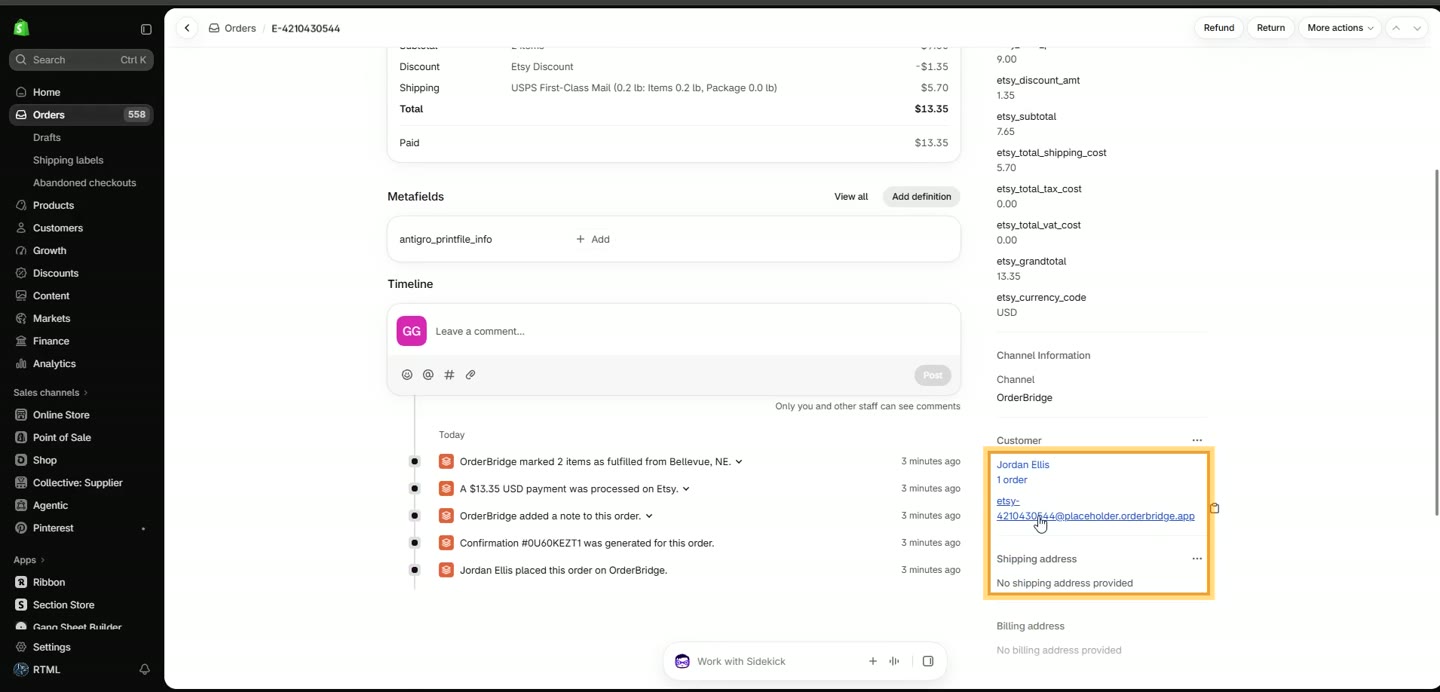
    For comparison: the same order imported live
  3. 3Why the placeholder matters

    Apps that email your customers, such as Judge.me review requests, Smile.io rewards and Shopify marketing, use the email on the Shopify order, so a placeholder never reaches the buyer. (For this guide we deleted the live-imported order, which also removes it from Shopify, and put the order back to Pending.)
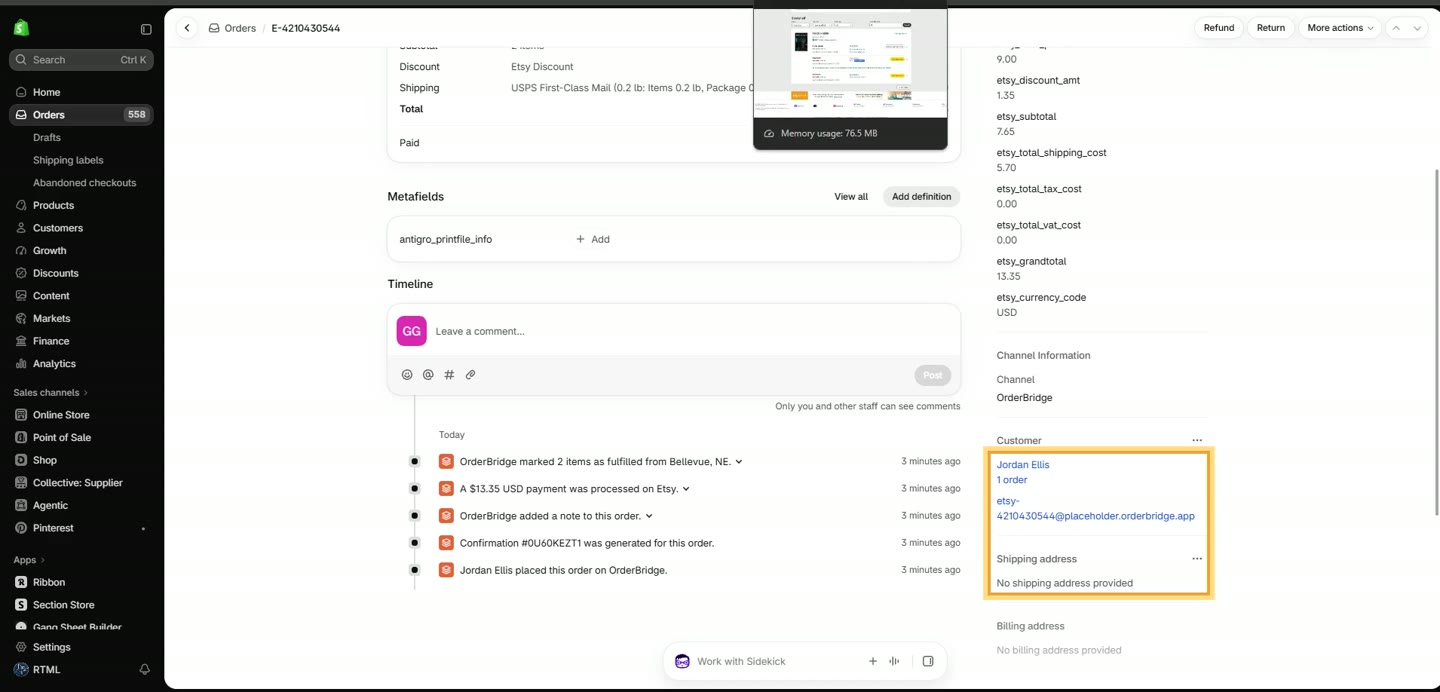
    Why the placeholder matters
  4. 4Open the extension: Sync Addresses

    Click the OrderBridge icon in Chrome's toolbar. It shows how many orders Need Address and how many Need Tracking. Click Sync Addresses.
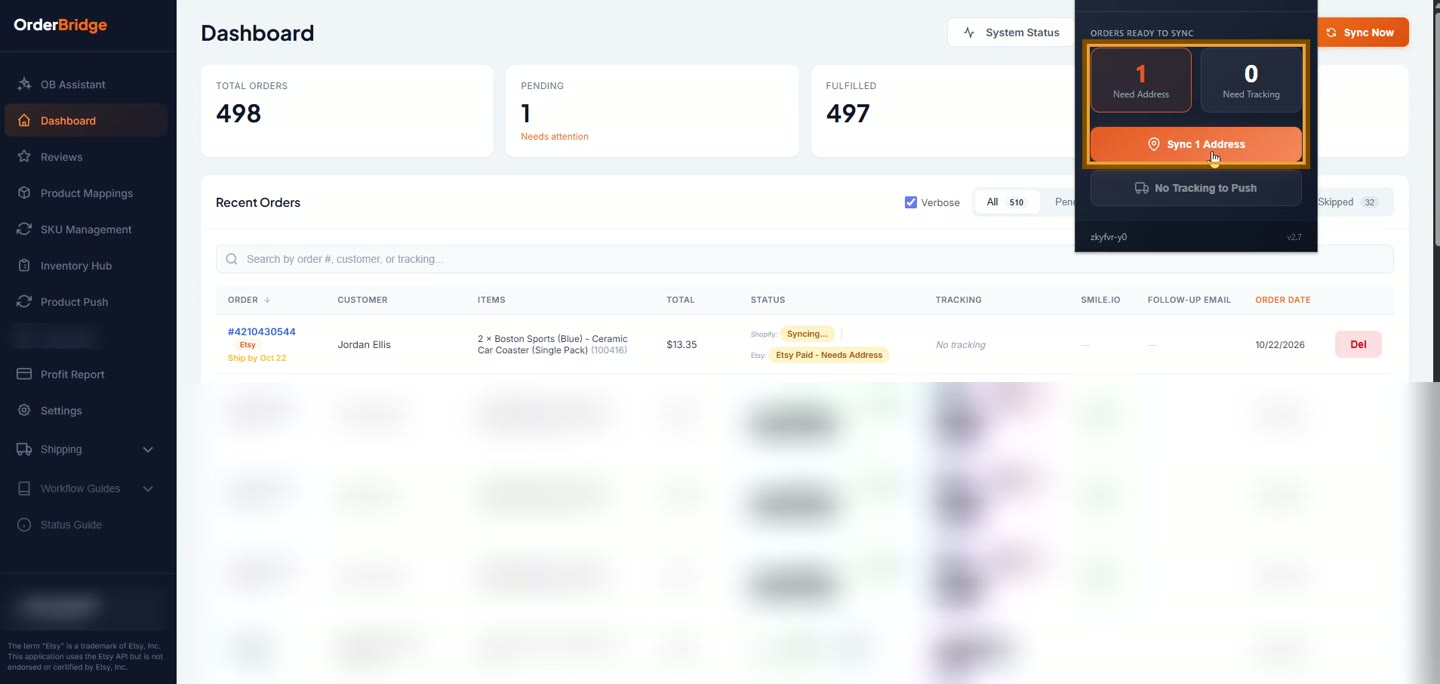
    Open the extension: Sync Addresses
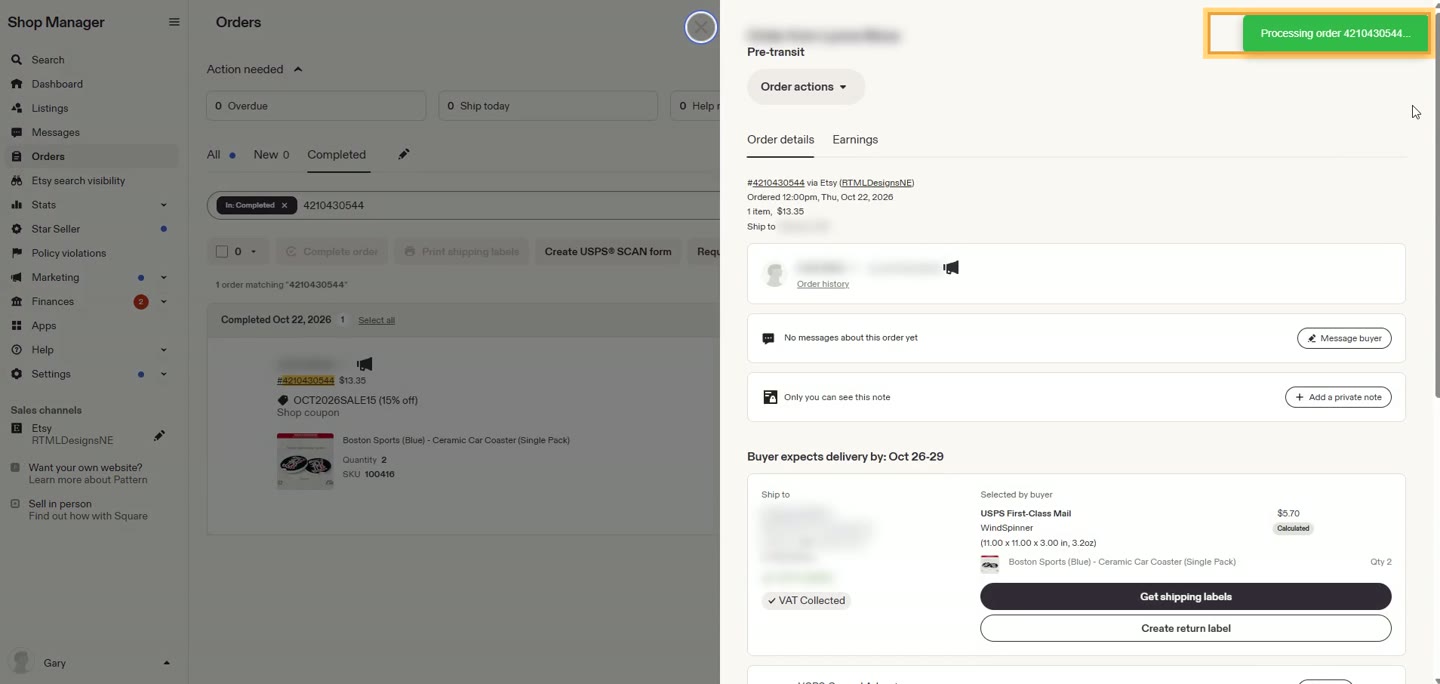
  5. 5The extension captures the real details

    The extension opens the first waiting order on Etsy, in your own logged-in browser, reads the buyer's shipping address and email from the order page and sends them to OrderBridge. With more orders waiting, it moves on to the next; when there are none left it says All done. Digital orders with no shipping address are recognised and skipped.
    The extension captures the real details
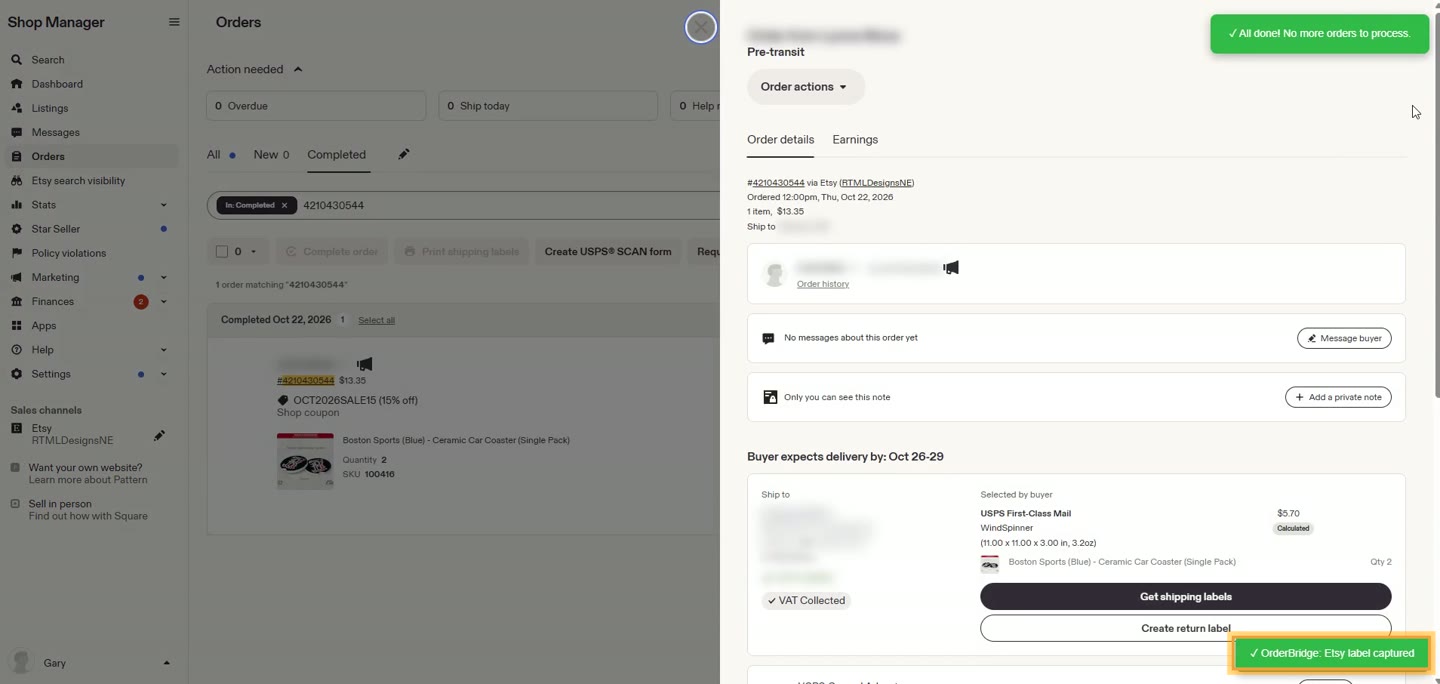
  6. 6Bought the label on Etsy? It's saved too

    If you bought the shipping label on Etsy, the extension also saves a copy of the label PDF when it visits the order, and shows Etsy label captured. Etsy's API can't return labels to apps, so this is the only way to get it. (Settings → Etsy Shipping Label Capture, on by default.)
    Bought the label on Etsy? It's saved too
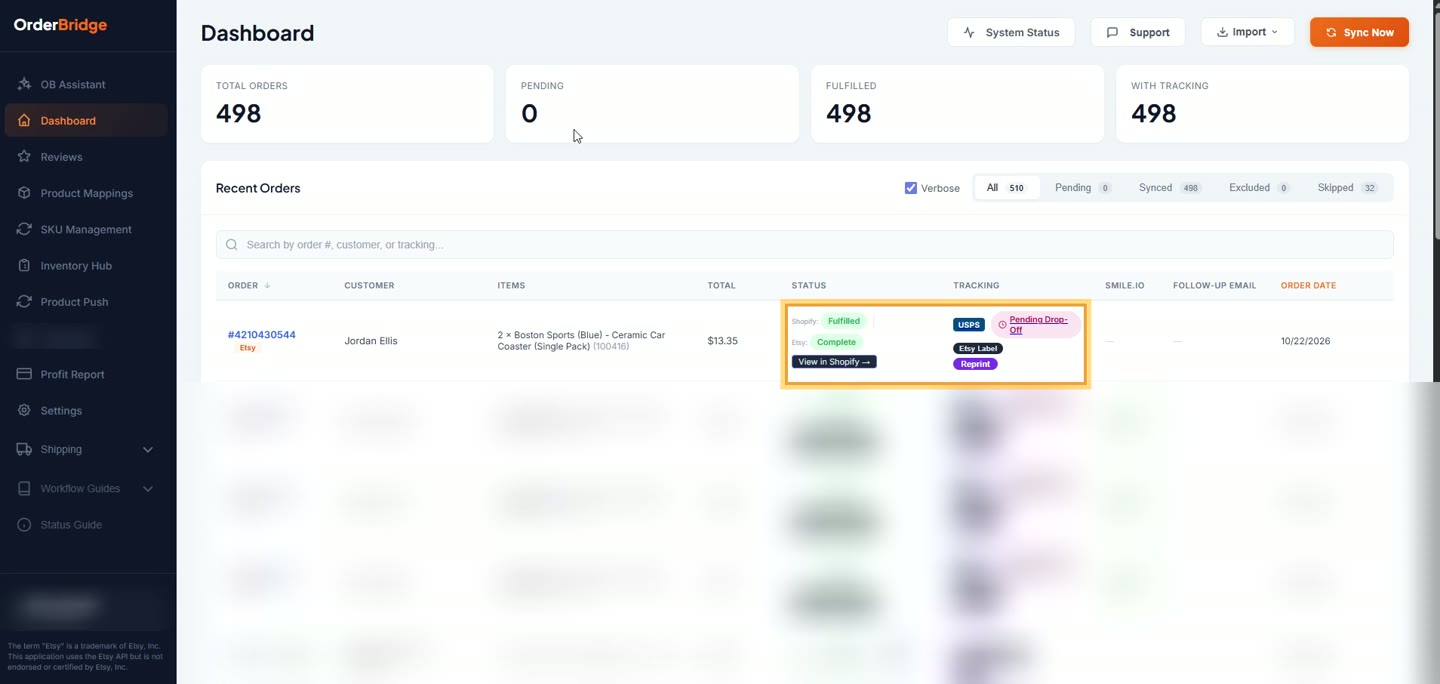
  7. 7Seconds later: the order is in Shopify

    As soon as the details arrive, OrderBridge creates the Shopify order. On the dashboard it leaves Pending, and an Etsy Label button downloads the saved label.
    Seconds later: the order is in Shopify
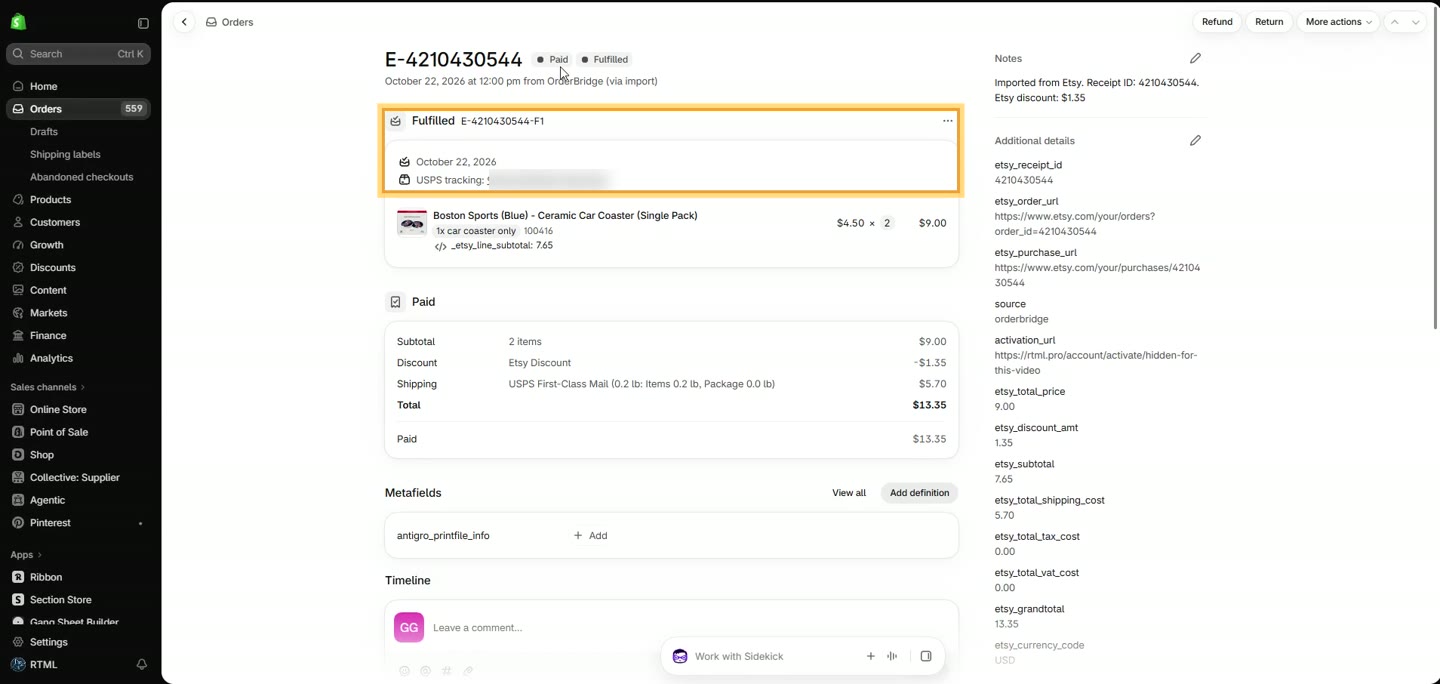
  8. 8Tracking is applied for you

    Tracking from an Etsy label is added to the Shopify order and the order is marked fulfilled automatically: at once if the label was bought before the import (as here), otherwise usually within about ten minutes of buying it.

    Ship with labels bought elsewhere (Shopify, Pirate Ship)? Once the Shopify order is fulfilled, the extension's Sync Tracking button opens each order on Etsy and fills in Etsy's tracking form for you; you check it and click Complete order.
    Tracking is applied for you
  9. 9In Shopify: the real email and address

    The Shopify order now has the buyer's real email and full shipping address (masked in this video), so review requests, rewards and order emails reach the actual customer.
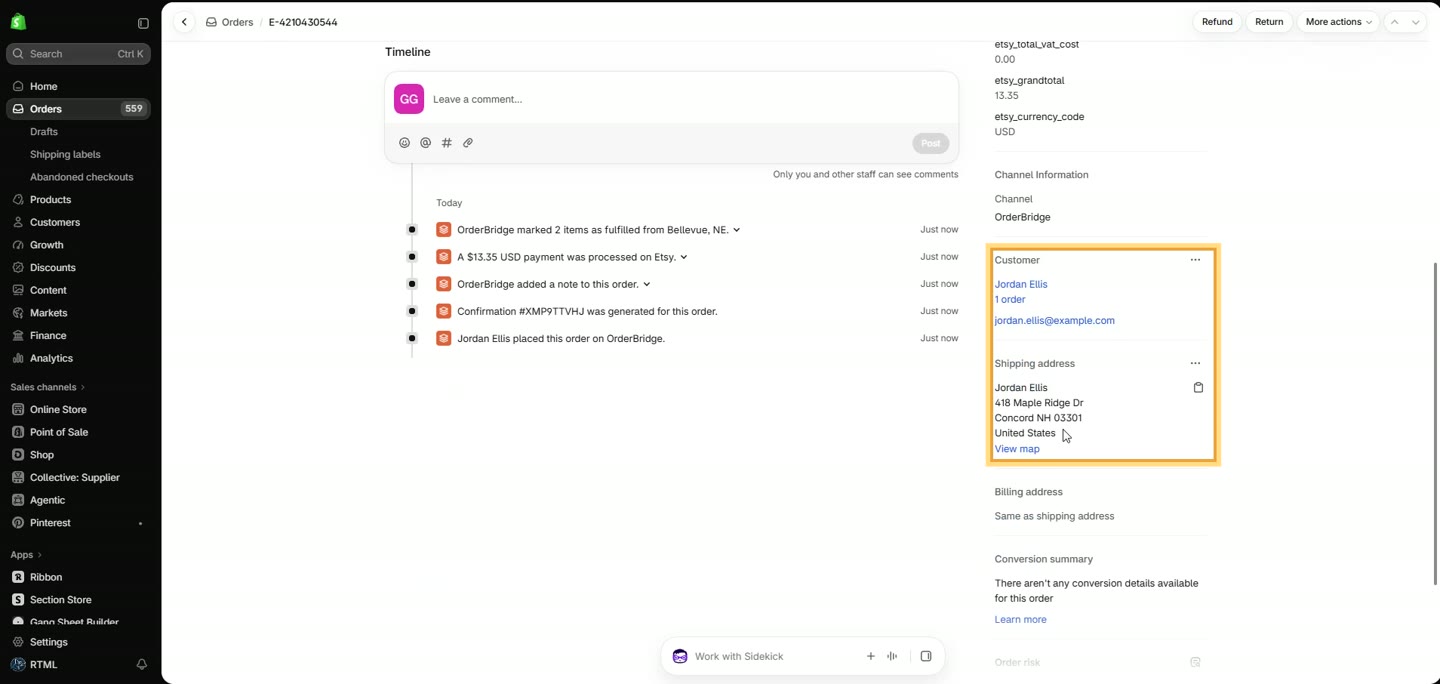
    In Shopify: the real email and address

Why This Matters for Your Business

  • Lower costs: Use Shopify's better shipping app ecosystem (like PirateShip)
  • Better reviews: Judge.me works properly with real customer data
  • Single source of truth: Manage everything from Shopify
  • Maintain Etsy presence: While leveraging Shopify's superior tools
  • Affordable automation: $2.99-$15.99/month vs. $30+ competitors
Start Your Free 7-Day Trial

No credit card required • Sync unlimited orders during trial

More OrderBridge Guides

Getting Started Guide → Auto-Restock Etsy Inventory → Delayed Import + Extension → Follow-Up Email Automation → SKU & Product Mapping → Tracking Notification Emails → Etsy Profit Report → Zero-Revenue Import → Custom Print Order Upload →

Ready to sync your Etsy orders to Shopify? Start your free trial →